Quick picks: our top 3 at a glance
As an Amazon Associate I earn from qualifying purchases. Prices and availability change.

For lawyers, every billable minute counts. Juggling case files, deposition transcripts, legal research, and client notes across paper notebooks and laptops can slow you down and create clutter. An e-ink tablet offers a focused, paper-like space where you can read, annotate, and write without the notifications and glare of a traditional tablet. That’s why we researched the best e-ink tablet for lawyers in November 2026 to help you select a device that fits a legal workflow.
We evaluated 4 leading models from reMarkable, Amazon, Penstar and more, ranking them on handwriting conversion, document annotation, display comfort, file organization, battery life, and focus-friendly design. No matter whether you work in a high-volume litigation firm or a solo practice, the right e-ink tablet can reduce paper chaos and streamline the way you handle legal documents. For a broader overview of options, visit our best e-ink tablets page.
At a Glance
| Product | Brand | Rating | Where to buy |
|---|---|---|---|
| Penstar eNote 2 10.3" E-Ink Notebook | Penstar | 4.2 / 5 | View on Amazon |
| Amazon Kindle Scribe Colorsoft 64GB | Amazon | 4.7 / 5 | View on Amazon |
| reMarkable Paper Pro Marker Plus and Folio Bundle | reMarkable | 4.9 / 5 | View on Amazon |
| Huion Ink EB1011 10.3-inch E Ink Tablet | HUION | 4.1 / 5 | View on Amazon |
Ratings come from the Amazon listings when we last checked and can change.
Pros
- Excellent readability with minimized haze and refraction due to removal of capacitive touch layer
- Supports over 35 file formats including PDF, EPUB, DOCX, and images
- Handwriting to text conversion for notes
- Split-screen functionality for books and notes
Cons
- No finger touch support (stylus only)
- Screen refresh is slower than tablets, not suitable for fast scrolling or video
- Split-screen currently limited to books and notes only
Pros
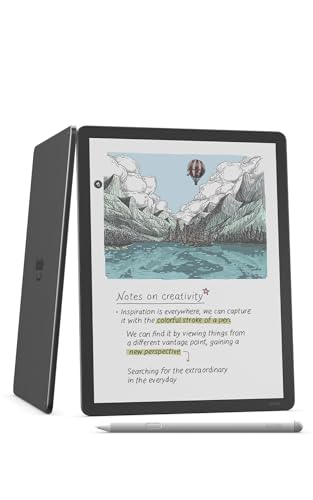
- Color E Ink display for reading and writing
- Large 11-inch screen
- 64GB storage capacity
- Included stylus for direct note-taking
- Front light for reading in any light
Pros
- Purpose-built digital notebook with no web browser or app store by design, which protects focus.
- Includes the Marker Plus stylus and a black leather book folio for a complete setup.
- Handwriting conversion supports over 30 languages, including English, Spanish, French, German, and Italian.
Cons
- No app store and no web browser, so it cannot replace a general-purpose tablet.
- Only DRM-free EPUB and PDF files are supported; DRM-protected ebooks from Kindle or Kobo will not work.
- E-Ink display shows ghosting and muted colors, and transitions feel slightly slower than a regular tablet.

Pros
- Paper-like writing experience with battery-free stylus (8192 pressure levels, felt tip, tail eraser).
- Adjustable dual-color front light with preset modes for day, night, and bedtime reading.
- Handwriting-to-text conversion and easy sharing via QR code, cloud, or screen projection.
- Android 11 with 64GB storage (expandable to 2TB) and up to 12-day battery life.
Cons
- 227 PPI resolution is clear but may not be as sharp as users expect from higher-resolution e-ink displays.
- Only available in silver color, limiting aesthetic options.
Best E-ink Tablet For Lawyers Buying Guide
Choosing an e-ink tablet for your legal practice is about more than picking a popular brand. The right device depends on how you read, annotate, and store documents. The following criteria will help you compare the strengths of each model and decide which one matches the way you work.
Handwriting Capture and Text Conversion
A lawyer’s first priority is capturing handwritten notes accurately. When you’re at a deposition, mediation, or client meeting, you need a device that records every stroke without lag. Look for a stylus that feels natural, palm rejection that prevents accidental marks, and software that captures your writing smoothly. The Penstar eNote 2 E-Ink Digital Notebook with Pen supports handwriting-to-text conversion, which is a helpful feature if you want to turn rough notes into searchable text later.
The reMarkable Paper Pro with Marker Plus and Black takes a deliberately focused approach. It prioritizes the feel of ink on paper, making it a favorite for lawyers who want to preserve the physical act of writing. Meanwhile, the Amazon Kindle Scribe Colorsoft 64GB lets you write in notebooks and documents, giving you a flexible option if you are already using Amazon services.
Handwriting conversion accuracy varies from one device to another. Most e-ink tablets let you export raw handwritten pages as PDFs, and some also convert your notes into typed text. For lawyers, a PDF of the original note is often the safest record. If you need searchable text, test the conversion engine with your own writing style. Some devices handle print-like lettering better, while others are more comfortable with cursive.
Pen pressure also affects the writing experience. The Marker Plus on the reMarkable Paper Pro offers a textured tip that mimics a pen, while the Penstar eNote 2 and Kindle Scribe come with capable styluses for most users. If you spend hours writing by hand, the feel of the screen and the weight of the stylus can make a big difference in your daily comfort.
PDF Annotation and Document Workflows
Legal work revolves around PDFs. Contracts, complaints, discovery responses, and court opinions all arrive in this format, so your e-ink tablet must handle document annotation gracefully. Look for the ability to highlight, underline, strike through, and add margin notes without altering the original document. The reMarkable Paper Pro is purpose-built for document markup, and the Penstar eNote 2 supports document annotation as well.
A color display can add another layer to annotation. The Amazon Kindle Scribe Colorsoft 64GB uses a paper-like color display that makes it easy to color-code exhibits or highlight different clauses in a contract. On the other hand, a monochrome display like the one on the Penstar eNote 2 keeps the visual field clean, which some lawyers prefer when reading dense text.
Before you buy, consider how you will get documents onto the device. Most e-ink tablets support cloud sync, email attachment forwarding, or direct USB transfer. If you often work with heavily formatted documents, check how the device handles fonts, footnotes, and page layouts. Our guide to best e-ink tablets for PDF reading dives deeper into these issues.
Display Quality and Eye Comfort
Long hours of reading dense legal text can leave your eyes tired. E-ink displays use reflected light rather than backlight, which mimics paper and helps prevent eye strain. The reMarkable Paper Pro offers a sharp black-and-white canvas that feels wonderfully close to a printed brief. The Kindle Scribe Colorsoft adds color to the e-ink formula without sacrificing the paper-like look.
Display size is also important. A larger screen means more of a page is visible without scrolling, which is helpful when reviewing multi-column case opinions. The Kindle Scribe Colorsoft’s 11-inch display provides a roomy workspace, while the 10.3-inch screens on the Penstar eNote 2 and reMarkable Paper Pro still allow comfortable reading of standard legal documents.
Lighting matters as well. If you often review cases at night, choose a device with a built-in front light. The Kindle Scribe Colorsoft includes adjustable lighting for reading in any light. The other models may require a nearby lamp, but in exchange they offer a more classic e-ink experience. Be honest about where and when you will use the tablet before making a choice.
File Management and Connectivity
Legal files need order. Look for an e-ink tablet that lets you create folders, apply tags, and rename documents quickly. A good file manager will help you sort case files by client, matter, or date. The reMarkable Paper Pro and Penstar eNote 2 both include companion apps for organizing and syncing your notebooks, while the Kindle Scribe integrates with Amazon’s ecosystem for seamless note sharing.
Connectivity affects how easily you can move documents between devices. Most e-ink tablets support Wi-Fi syncing to a cloud service, and some offer USB-C file transfer. If you are concerned about exposing confidential client information, choose a device with robust security features such as passcode lock, local-only storage options, and encrypted transfer. Check the manufacturer’s privacy policy before relying on a cloud service for sensitive material.
When comparing products, consider whether the tablet’s file format is compatible with your case management software. Most devices can export notes as PDF or PNG files, but some use proprietary formats for the raw notebook data. For solo practitioners, sharing a PDF is usually enough. For larger firms, you may need a solution that exports to a document management system. Visit our note-taking resource center for deeper guidance.
Battery Life and Portability
A legal professional is always on the move. Between court dates, depositions, and office hours, an e-ink tablet should reliably last through a full day and beyond. E-ink displays consume very little power, so most devices offer significantly longer battery life than conventional laptops or tablets. The exact number of hours depends on how much you write, read, and sync, but you can generally expect days of use on a single charge with light to moderate activity.
Portability is about more than weight. A 10.3-inch device can slip into most briefcases, while an 11-inch device may feel more like a small laptop. The Penstar eNote 2 and reMarkable Paper Pro are known for their slim profiles, making them excellent companions for a busy lawyer. The Kindle Scribe Colorsoft offers a larger display, but check its overall footprint and your carrying setup before buying.
Think about how you will use the tablet in real-world settings. Are you reading a statute at a desk? Annotating a deposition at a conference table? Scanning a client file in the courthouse hallway? Each scenario calls for a slightly different balance of battery life, weight, and screen size. If you can, handle the devices in person or compare their dimensions and weight online.
Distraction-Free Focus vs. Ecosystem Versatility
One of the biggest advantages of an e-ink tablet for legal work is the reduction of digital distractions. The reMarkable Paper Pro is designed with a philosophy of focused writing and reading: it deliberately lacks a web browser and third-party apps, so you will not be tempted to check email or social media while reviewing a contract. This focus can increase your productivity and make it easier to bill your time accurately.
The Amazon Kindle Scribe Colorsoft, by contrast, is part of the larger Amazon ecosystem. It gives you access to Kindle books and other digital content, which is convenient if you like to keep professional and leisure reading in one place. However, the same ecosystem can introduce distractions. The Penstar eNote 2 takes a middle path, offering a dedicated note-taking environment with home widgets for quick access to your most recent documents.
Before choosing, ask yourself which philosophy fits your work style. If you are prone to notification fatigue, a focused device like reMarkable may be worth the trade-off. If you want one gadget for both legal reading and casual reading, the Kindle Scribe is appealing. To see how these two popular options compare, read our reMarkable vs Kindle Scribe comparison.
Why You Should Trust Us
Our team of editors and researchers has spent years tracking the e-ink tablet market and testing the features that matter to professionals. We build our rankings from a combination of manufacturer specifications, user feedback, and independent analysis. We do not accept paid placements, and we do not allow Amazon relationships to influence our product picks. Our goal is to give you a reliable starting point for your own purchase.
For this guide, we focused on the specific needs of lawyers: searching handwritten notes, annotating PDFs, organizing client files, and maintaining focus during deep work. Each best e-ink tablet for lawyers in our roundup was evaluated against the same criteria, including note-taking accuracy, display quality, storage, portability, and ecosystem integration. While we cannot replicate every attorney’s workflow, our structured approach ensures that the products on this list have the features most likely to benefit a legal practice.
Final Thoughts
After reviewing all 4 products, we believe the reMarkable Paper Pro with Marker Plus and Black is the best overall best e-ink tablet for lawyers for most lawyers. Its paper-like display, focused design, and powerful document markup capabilities make it a natural replacement for a legal pad. If you value concentration and an uncluttered interface, this tablet is hard to beat.
For the best value option, consider the Penstar eNote 2 E-Ink Digital Notebook with Pen. It delivers the essential note-taking and annotation tools in a simple, efficient package, making it a smart choice for new users or smaller firms. Meanwhile, the Amazon Kindle Scribe Colorsoft 64GB stands out for lawyers who want a color display and deep integration with Amazon’s reading ecosystem. That makes it a versatile pick for both professional work and personal reading.
Whichever e-ink tablet you choose, the goal is to make your legal workflow smoother and less paper dependent. Start with the model that aligns with your daily habits, then explore how you can integrate it with your document management system. For more suggestions, check out the best e-readers collection and our note-taking guides.
Frequently Asked Questions
What is the best e-ink tablet for lawyers in 2026?
The reMarkable Paper Pro with Marker Plus is our top pick for the best e-ink tablet for lawyers in 2026 because it combines a distraction-free environment with excellent handwriting and document annotation features. It gives lawyers the focused experience of a paper legal pad while preserving the ability to organize and export notes digitally.
Can I use an e-ink tablet to sign legal documents?
Yes, e-ink tablets let you add a handwritten signature to a PDF and export the signed document. The legal acceptance of electronic signatures depends on your jurisdiction and the specific rules of your court or practice. Always keep a secure backup of your executed documents and follow the requirements of the relevant legal authority.
Is a color e-ink display worth it for lawyers?
A color e-ink display, like the one on the Amazon Kindle Scribe Colorsoft, can be helpful when you annotate color-coded charts, maps, or exhibits. For most text-heavy legal reading, a monochrome display is perfectly sufficient and often more affordable. Think about the kinds of documents you encounter daily before deciding.
Can an e-ink tablet replace a laptop for legal work?
No. An e-ink tablet is best for reading, note-taking, and annotating documents, but it cannot replace a laptop for legal research, email, video conferencing, or complex word processing. Lawyers typically use an e-ink tablet as a companion device that keeps them focused during deep reading and note-taking sessions.
How can I improve organization on my e-ink tablet for case files?
Use folders, tags, and consistent naming conventions to keep your case files organized. The reMarkable Paper Pro, Penstar eNote 2, and Kindle Scribe all offer organizational tools, but the exact workflow differs. You can find more ideas in our note-taking guide.